Mode of Payment
The Mode of Payment stores the medium through which payments are made or received.
To access the Mode of Payment list, go to:
Home > Accounting > Settings > Mode of Payment
1. Steps to create a Mode of Payment
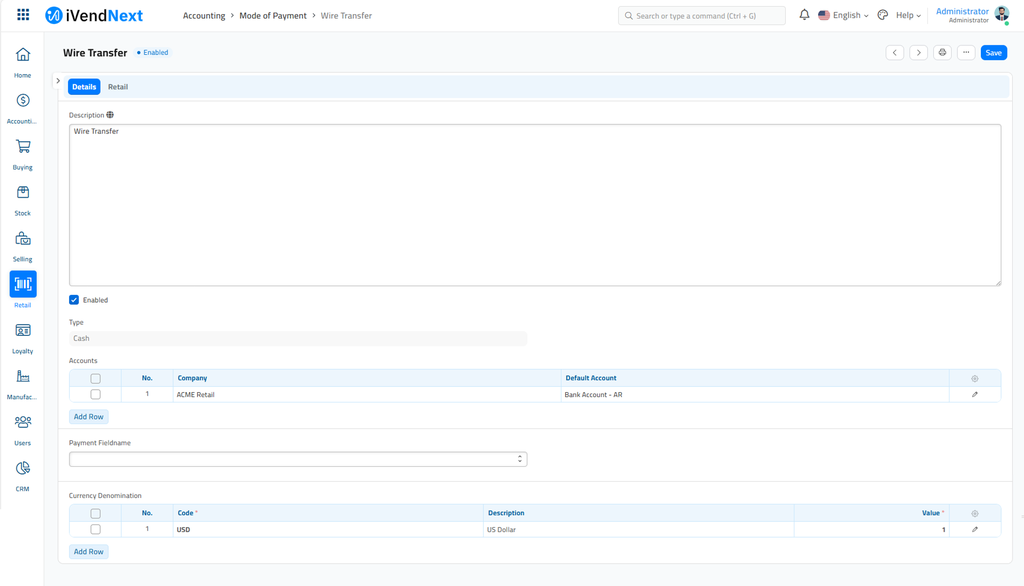
Go to the Mode of Payment list and click on New.
Enter a name for the Mode of Payment.
Set a type whether Cash, Bank, or General. This is useful for knowing the mode of payment used in Point Of Sales (PoS).
Set a default payment Account for all the companies.
Save.
Note: When making Payment Entries, the default bank account will be fetched in the following order if set:
  * Company form
  * Mode of Payment default account
  * Customer/Supplier default bank account
  * Select manually in Payment Entry