
iVendNext POS · checked 2026-10-26
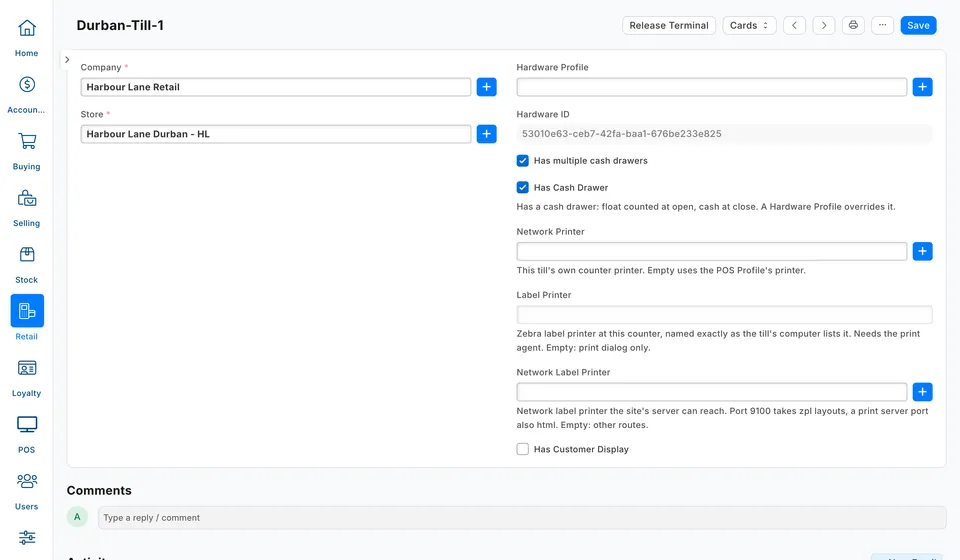
A POS Terminal is one till at one store. When a cashier starts the day, the device takes a free POS Terminal and keeps it. The record also tells the till whether it has a cash drawer, which printers it uses, and whether a screen faces the shopper.
Where to find it
In iVendNext Desk, type POS Terminal in the search bar and open the list. Select Add POS Terminal to make a till. You give the till its name when you create it. Open a row to change a till you already have.
What the iVendNext POS does with it
When a cashier starts the day, the till lists the free POS Terminals at the stores that cashier may use. The cashier picks one by name. A device that already uses a till at that store goes straight to it. See Starting Your Day.
When the day starts, the device writes its own ID into Hardware ID. A till with a Hardware ID is in use, so no other device and no Desk POS can pick it. The device keeps the till after the day closes, after a suspend and after a sign out. It lets go only in three cases: the device is revoked, the device moves to another store, or someone frees the till. See Managing Devices.
Has Cash Drawer decides the kind of day. On a till with it ticked, the cashier counts a float in, takes cash, and counts the drawer at the close. On a till without it, the day is drawerless, and the cashier sends a cash sale to a till that has a drawer. A day keeps the kind it opened with, even if you change the box later. See Your Trading Day and Cash and the Drawer.
Freeing a till from Desk
- Open the till's POS Terminal.
- Select Release Terminal. The button shows only while the till is in use and the form has no unsaved changes.
- Hardware ID clears, and the till is free again for the iVendNext POS and the Desk POS.
To free several tills at once, tick them in the list and choose Release Terminals from the Actions menu. The device that had the till asks for a till at its next start of day.
Desk does not check for an open day. A manager can also free a till from the phone, and the phone refuses while a day is open on it. Close or suspend that day first.
The fields that matter
| Field | What to enter | What the till does |
|---|---|---|
| Company | The company the till sells for. Required. | Desk lists only this company's stores in Store. |
| Store | The store where the till stands. Required. Desk lists only stores with Is Retail Store ticked. | The till shows in the till picker of each cashier who has this store. |
| Hardware ID | Nothing. The system fills it in. | It names the device that has the till. Empty means the till is free. |
| Has Cash Drawer | Tick it if this till counts cash at the start and end of the day. | It decides a drawered or drawerless day. When a Hardware Profile is set, the box is locked and follows the profile's drawer setting. |
| Hardware Profile | The printer, drawer and pole display wired to this counter. Optional. | On a counter with the print agent installed, the till opens the drawer and prints through it. |
| Network Printer | This till's own counter printer. Optional. | Receipts and shift papers print here. Empty uses the POS Profile's printer. |
| Label Printer | The label printer at this counter, named exactly as the till's computer lists it. Optional. | Labels print on it through the print agent. Empty: the print dialog only. |
| Network Label Printer | A label printer on your network that the server can reach. Optional. | The till sends labels to it. Empty: the till uses its other label routes. |
| Call Number Prefix | A short prefix, such as A. It must be unique in the store. | When the POS Profile has Call Numbers on, each paid sale gets this till's next number for the day, such as A-17. Empty: the till's name comes first, or the bare number in a one-till store. |
| Has Customer Display | Tick it if a screen faces the shopper at this till. | The till shows the sale on that screen while you ring it up. |
| Customer Display Hardware ID | Nothing. The display fills it in when it pairs. | To pair a new screen, select Release Customer Display first. Desk confirms with "Customer display released successfully". |
| Has multiple cash drawers | Nothing for the iVendNext POS. | The iVendNext POS uses one drawer per till and does not read this box. |
Before you start
- A company, and a store with Is Retail Store ticked. See Warehouse.
- A free till license. Each POS Terminal counts as one till license, and Desk refuses to save a till past your license.
- A Hardware Profile, if the counter has a wired receipt printer or cash drawer. Make it before you link it here.
- Cashiers who have this store on their user record, with a POS Profile for it. See POS Profile.
What a cashier or manager sees when it is wrong
| What you see | What it means | What to do |
|---|---|---|
| "Every till here has an open day or is in use by a device. Ask a manager to free one up." | No POS Terminal at the store is free. | Free a till, or add a POS Terminal for the store. |
| "That till still has an open day. Resume it there, or pick another till." | Someone has an open day on the till the cashier picked. | Resume that day on its own till, or pick another till. |
| "Till-2 shares its drawer setting with other tills. Ask an admin to change it." | The phone's drawer switch refuses, because the till's Hardware Profile serves other tills too. | Change Is Cash Drawer Attached on the Hardware Profile in Desk. Every till on that profile follows it. |
| "Till Till-2 in this store already uses the call number prefix A." | Desk refuses the save, because another till in the store has that prefix. | Choose another prefix. |