
Sorting Order in List View
Question:
I want records in my Item List sorted based on Descending Order of Item Code.
Answers:
Following are the steps to customize Sort Order for the Item master. These steps will be applicable for customizing Sort Order for the other documents as well.
Step 1: Go to Customize Form
Home > Customization > Form Customization > Customize Form
Step 2: Select DocType
Select document type for which Sort Order is to be customized.

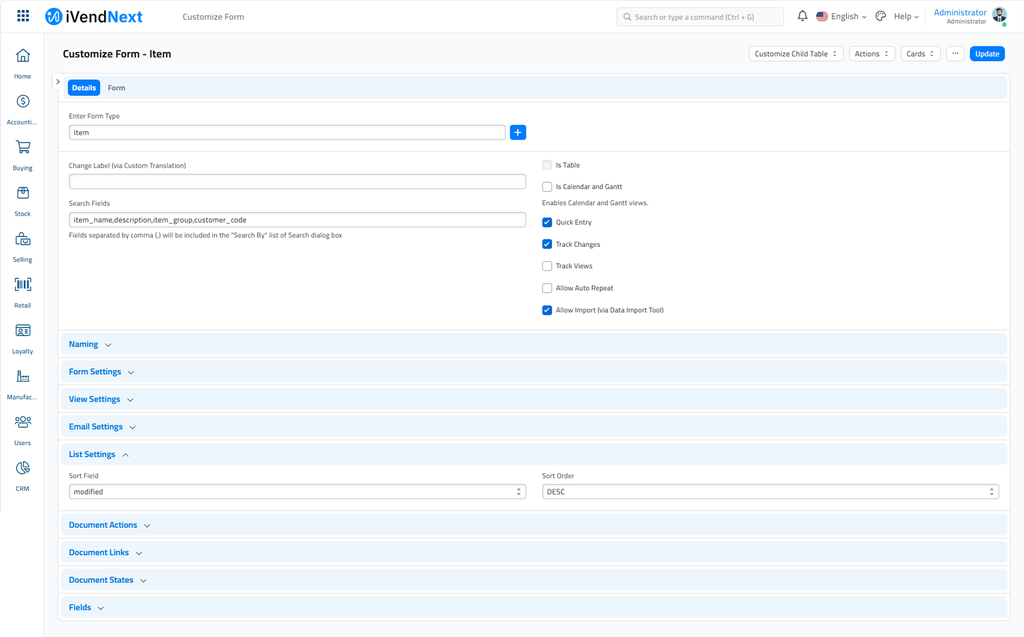
Step 3: Update Sort Details
In the Customize Form, you will find these fields.
-
Sort Field: Select the Field based on which sorting will be done. It will be "Item_Code" field in the scenario.
-
Sort Order: Sort Order will be two possible options, Asc for ascending, and Desc for descending.
Last updated 3 months ago
Was this helpful?