
Returning With a Receipt
A receipted return finds the original sale by its sale number, lets you choose what comes back, and then pays the refund back on the phone or sends it to a register. This is the ordinary return route. For a return where the customer has no receipt, see Returning Without a Receipt.
Prerequisites
- A settled sale in this store to return against.
- The ordinary return permission on your sign-in.
- A signed-in operator on an enrolled, active device. Every money-moving step checks this. See Managing Devices.
- To pay a refund back on the phone: at least one payment method flagged for returns on your till's profile.
Finding the sale by receipt
- Open Returns.
- Search or scan the sale number. You can scan the receipt code with the camera or a connected scanner, or type the number. See Scanning and Searching.
- Results come back a page at a time, from the server, and cover your own outlet: your store's company and the warehouse your till profile is bound to, registers included. A sale sold at a fixed register in your store can be returned on the phone. A sale from a different store's outlet never appears in the results.
Reading the sale before anything moves
When you open the sale you found, it opens in a read-only view, so you can look through it without changing anything. Each line shows whether it can be returned, and where it cannot, the reason why. Nothing is selected yet, and nothing has changed. You choose the lines to return next.
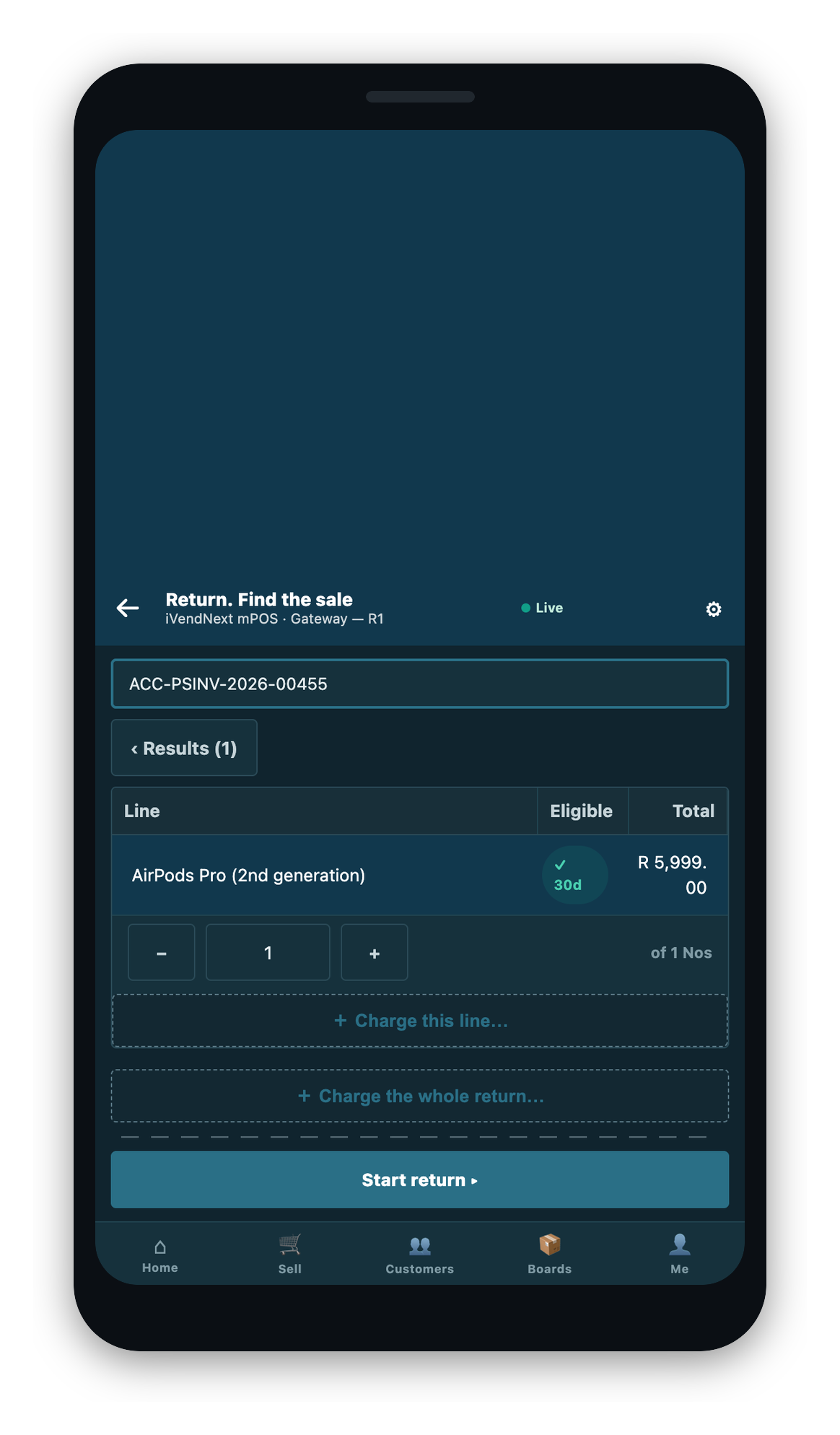
A line can be marked unavailable for one of these reasons:
- A line on a credit note. A return cannot itself be returned.
- A coupon line or a gift-card line. Neither is returnable.
- A non-returnable item. The item itself is marked that way.
- A promotional-quantity line. Refused where your store has that refusal switched on.
- The return window has ended. Your per-item day count has passed, and the date it ended is named for you.
- Already returned. Nothing is left on that line.
- A serialized line with an earlier part return against it. The service desk handles that one.
These verdicts are advisory chips. They mirror the rules your store's system enforces when it builds the credit note, and they cannot let through anything that system would itself refuse. They are there so that you find out early, before you work through a whole return on a line that was never coming back.
Cross-store and delivery lines
- A cross-store order line is handled in iVendNext Desk, whether or not it was delivered. There is no route that returns it on the phone.
- A delivery the phone made can be returned at the store that delivered it. Search the delivery number, and its lines are offered like any other sale. The whole remaining order line comes back at once, and a part-delivered line is refused with a message that sends you to the order desk.
Choosing what comes back
- Select the lines. Only lines with a clear verdict can be picked.
- Set a quantity where it is a part return. Each line is capped at what remains returnable: what was sold, less what has already come back on earlier returns.
- Give a reason where your store asks for one. The list you are offered is your store's own return reasons, set up in iVendNext Desk. Where your store does not ask for a reason on returns, none is asked for and none is recorded.
- Add a return charge if your store uses them. A restocking-style fee is picked from your store's own defined charge list. You cannot type its amount: the figure is always priced by your store's system. A charge that would fail to book is not offered at all.
- Read the preview. The figures are your store's composed credit note, already re-priced for the part quantities and any charge you added. Nothing has been written yet.
Part quantities and serialized lines
A part return re-works your store's own pricing and any surcharge on the server, so nobody has to work out the tax on two of five items by hand. The amount refunded is the figure your store's system composed.
A serialized line returns in full or not at all. If part of it came back on an earlier return, this one goes to the service desk. A serial belongs to a whole unit, and half a tracked unit is not something the stock record can carry.
If no return reason has been set up
Where your store asks for a reason and no active return reason has been set up, no list appears and the return cannot be completed until an administrator adds one. Treat at least one active return reason as a setup step. A new installation arrives with a return reason already set up, so a store reaches this state only by switching every return reason off, or deleting them, while still asking for one.
Paying the refund back
Once there is something owed back, you have two routes: settle it here, or send it to a register.
Settling on the device
A net refund can be paid back on the phone to any payment method your store permits for returns. One server call composes and submits together. There is no in-between draft, so a crash cannot leave a half-made refund that looks parked but was never handed to anyone.
The chooser shows every payment method your store configured on this till, each carrying its own verdict. A method that cannot be used shows the rule beside it rather than quietly disappearing, so you see the alternatives at the same moment you see the refusal.
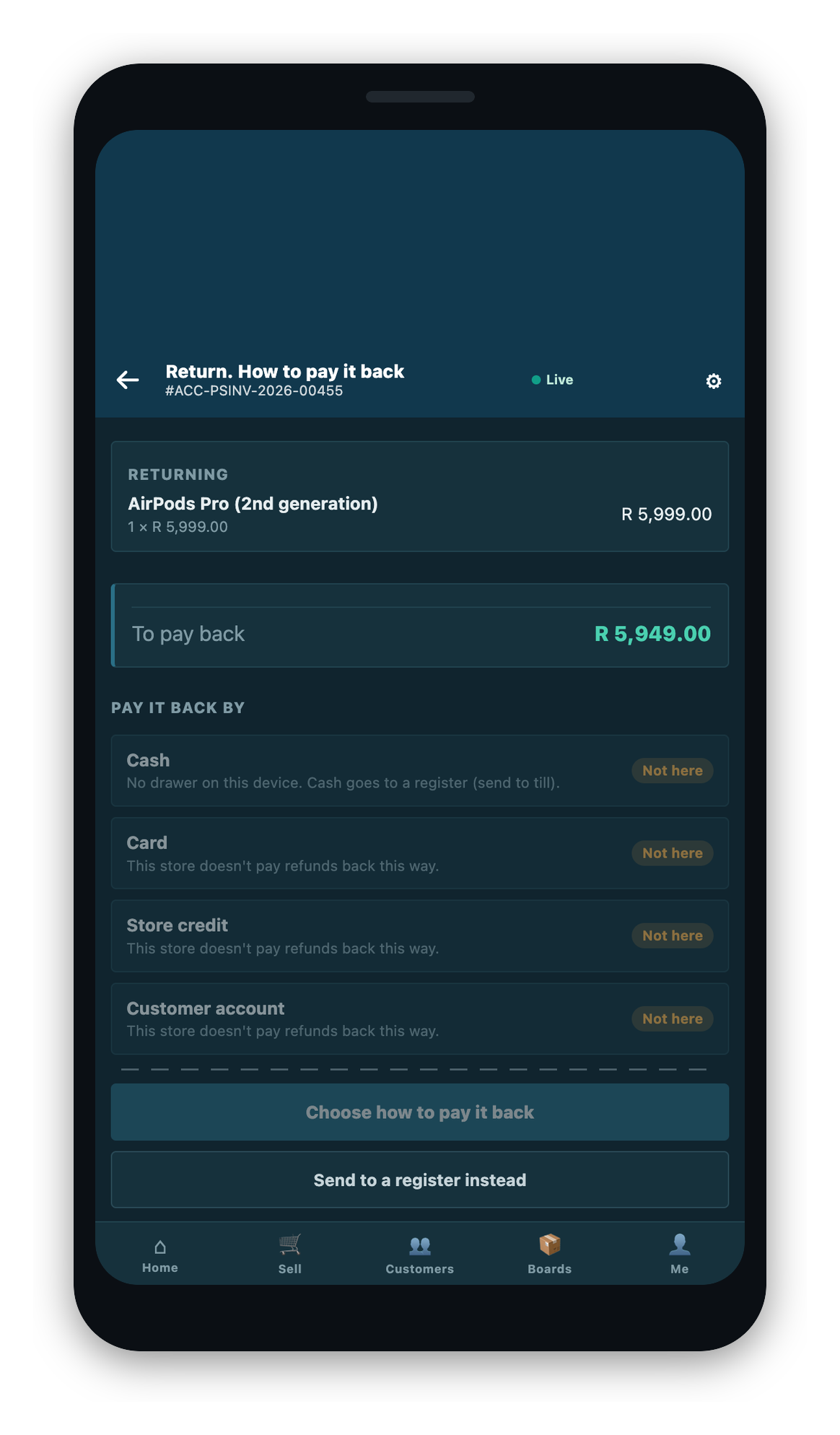
What you can pay a refund back to depends on your own configuration. The classes the phone recognizes are cash, card, gift certificate, store credit, on account, cheque or bank draft, and voucher. Which of those appear, and which are usable, is decided by the payment methods on your till's profile and by whether each one is flagged for use in returns.
A gift certificate is never a refund destination, whatever its flag says. This is a fixed exclusion, checked before the flag is even read. One limit is worth knowing: this rule applies on the device. A return parked to a register is settled through iVendNext Desk, which this rule does not reach.
Splitting a refund across several methods
A refund can be paid back as several parts. Each part carries its own method, its own named payment row, and its own amount. The parts must add up to your store's composed total exactly: the tolerance is zero, and any shortfall or excess is named. Each part is judged individually by the same rule a single-method refund meets. Two parts that name the same method and payment row are refused rather than merged, because merging would turn a double-tap into a single row and hide it. Your store can cap how many parts a split may have. Without a cap set, there is no limit.
Cash refunds
Cash follows how the day was opened, not a setting someone can change while you are serving.
On a session opened with a drawer, cash pays out of that drawer under the same rules every other method meets, plus three conditions of its own:
- Only your till's own resolved default cash method pays out.
- Your till's cash rounding must be able to make the exact amount. If it cannot, the refund refuses rather than booking a changed figure.
- The drawer must have enough, counted net of change already given out.
On a session opened without a drawer, cash refuses. A phone that cannot take cash in does not hand cash out, and the refusal names the register route. Whether a session has a drawer is a property of the opening, not of the till record, so a drawered day that has been suspended reads as drawerless. See Cash and the Drawer and Starting Your Day.
Store credit
A store-credit refund mints a certificate through your store's own issuing step, sized from that part's own amount. The certificate carries a real balance for the customer to spend later. If you split a refund across two store-credit parts, two separate certificates are minted, and both are reported back to the screen so neither is lost.
Card
Card is one of the classes a store can allow for refunds. In this release, the cashier refunds on the bank's own card machine, and the phone records that it was done. That is the basis on which card is a permitted refund destination today.
Sending the return to a register
This is the ordinary route, not a fallback. For a no-receipt return, it is the only route.
The composed credit note is saved as a suspended draft at a register you choose, with the whole return context kept: the sale, the lines, the quantities, the reason, and any charges. The register recalls it in the normal way and pays the refund from its drawer.
- No money moves on the phone on this route: the parked draft carries no payment rows at all.
- The register you pick must have a drawer, and it cannot be your own till.
- Why a draft was parked is recorded separately from why the goods came back. The two reasons sit on the document together.
- A park slip prints where your administrator has set one up.
Where your store has the send-to-register route switched off, parking is refused up front rather than creating a document no register could ever recall.
Related Topics
- Returns and Exchanges: the overview and the money-safety checks
- Returning Without a Receipt
- Exchanges
- Scanning and Searching
- Cash and the Drawer