
You start your trading day by signing in, choosing the till you are standing at, and, on a drawered till, counting the float in. On a drawerless till, the day opens in one tap.
Prerequisites
- A till (POS Terminal) is free at your store.
- Your account has a store and a register profile assigned to it. If either is missing, the app names the setting to fix.
Steps to start your day
- Sign in. See Signing In.
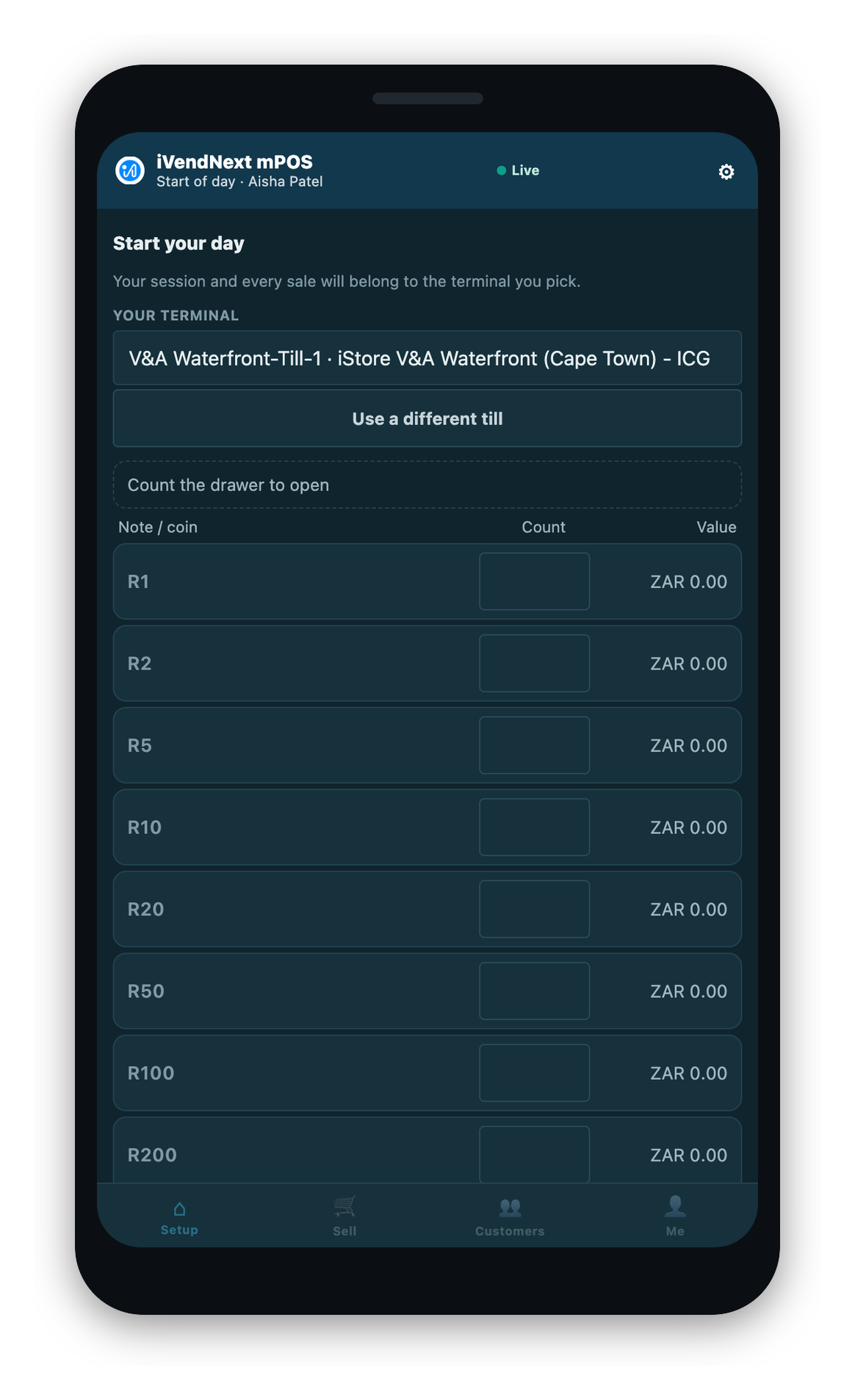
- Choose your till. Pick the till you are standing at, by name. If this phone is already mapped to a till at this store, that till is used with no picker.
- Count the float, if this is a drawered till. See below.
- Start the day. Your day opens and you go to your home screen.
Choosing your till
The till picker lists the tills at your store, with a placeholder that reads — choose a till —. You must pick one on purpose. There is no pre-selected row, so tapping straight through cannot claim someone else's till by accident.
If the phone is already mapped to a till, that till is offered without a picker. To use a different one, choose Use a different till.
A till that already has another person's open day on it cannot be claimed. The app says the till still has an open day, and to resume it there or pick another.
If no till is free
The app tells you plainly that every till at your store is in use, and what to do: ask a colleague to free one, or ask an administrator to add a till. A manager with the right permission can free a till from the phone. On the till list for their own stores, each row shows who has the till and whether a day is still open on it. A till with no open day can be freed in one tap, and the release is recorded. A till that still has an open day is not offered a release. That day must be closed or suspended first.
Opening a drawerless day
There is no float to count. The app tells you plainly that there is no cash drawer on the phone and cash goes to the till. Tap to start, and you are selling.
Opening a drawered day
On a drawered till, you count the float you are putting in.
- The app shows one row for each note and coin value your store counts.
- Type the count for each value. The running float total builds itself.
- You never type a total. The store's system works the float out from your counts, so the figure on the device cannot be nudged by hand.
- Start the day. From this moment the day is a drawered day until it closes.
Some tills count the float as a single total rather than note by note. On those, you type the opening total instead of a grid, matching how the store's register is set up.
If the till's cash counting is not set up yet, the app says so and asks you to try again once the note and coin values are added, rather than opening a day with a zero float.
If you cannot start your day
The app names the reason rather than failing silently. Besides "no till is free" above, the ones you may meet are:
- The till's setup changed while you were on the start screen. If the drawer setting changed (a drawer was added or removed), the app asks you to start the day again, so a day never opens on the wrong footing.
- This till cannot count cash yet. The till's cash has no note and coin values set up. Ask a manager; counting starts once they are added.
- Your store or register assignment is incomplete. The app names the exact setting for a manager to fix, and never reads this as "no tills left".
Retail License Settings
Retail License Settings in iVendNext Desk sets how many tills and devices can have a trading day open at once. Only a System Manager can open it. It is a single settings screen, not a list.
| Field | What it does |
|---|---|
| Concurrent POS Seats | The number of seats: tills plus devices in use at the same moment. 0 means no limit. Your cloud provisioning normally sets it. |
| Seats Note | Where the number comes from, such as the contract or its renewal date. For information only. |
| Seats In Use | The seats in use right now. Close a session's day to free its seat, and open the Active POS Seats list to see who has them. |
When every seat is taken, the app tells the person starting a day that all the POS licenses are in use and asks them to have a colleague end their session.