
A Credit Note is a document sent by a seller to the Customer, notifying that a credit has been made to their account against the goods returned by the buyer.
A Credit Note is issued for the value of goods returned by the Customer, it may be less than or equal to the total amount of the order.
1. How to make a Credit Note
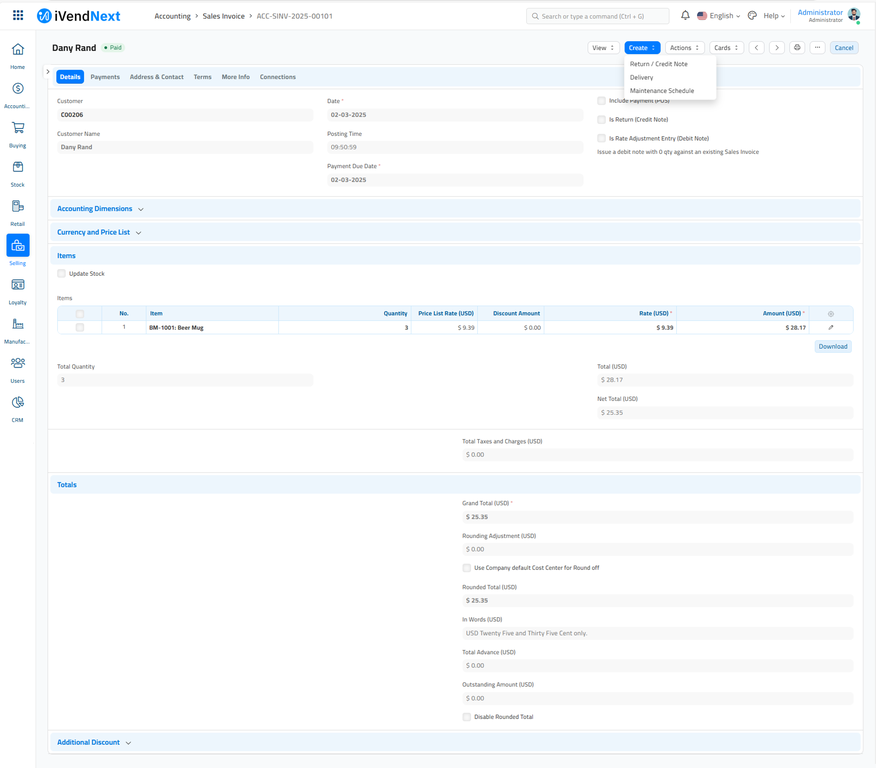
You can make a Credit Note from a submitted Sales Invoice, whether the invoice is paid or not.
Go to the respective Sales Invoice and click on Create > Return / Credit Note.
The Customer and Item details will be fetched as set in the Sales Invoice.
The Credit Note keeps its own negative balance for that Customer, because Update Outstanding for Self is ticked by default. You can refund it with a Payment Entry made from the Credit Note.
Save and Submit.
The Item quantity and Payment amount will be negative since it's a return.
1.1 How does Credit Note affect ledger
The Credit Note keeps its own negative balance on the Customer's account. The next time the Customer makes a purchase, you can adjust that balance against the new invoice.
Refer the Sales Invoice page for any other details.
1.2 No payment was made against Sales Invoice
In case no payment was made against the original invoice, you could just cancel the Sales Invoice. But, if only 5 out of 10 Items are being returned from an invoice, creating a Credit Note is useful for updating the ledger.
2. Example
Customer John purchased golf balls worth USD 300 plus taxes. Upon delivery, he discovered the products were damaged. John has since returned the items, and a credit note will be issued.