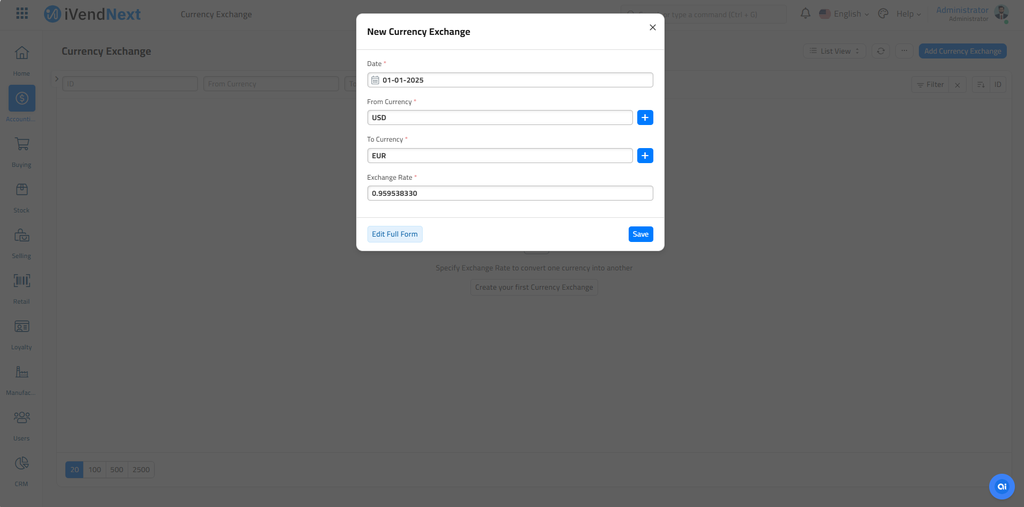
The Currency Exchange form stores exchange rates that you enter yourself. When a transaction needs a rate, iVendNext reads your saved rates first. The one exception is US dollar to UAE dirham, which always uses the fixed rate 3.6725. It takes the newest Currency Exchange record on or before the transaction date that applies to the transaction, buying or selling. If there is no saved rate, iVendNext fetches the rate for the transaction date from the service set in Currency Exchange Settings.
Your saved rates are always used before the online rate. You do not need a setting for that. The setting Allow Stale Exchange Rates in Accounts Settings decides two things: how old a saved rate may be, and whether you can edit the Exchange Rate field. When it is ticked, a saved rate of any age is used, and the Exchange Rate field in a transaction stays editable. When it is not ticked, iVendNext ignores saved rates older than the number of days in Stale Days, and the field in the transaction is locked.
To access the Currency Exchange list, navigate to:
Home > Accounting > Currency Exchange

1. How to create a Currency Exchange
Go to the Currency Exchange list and click on New.
Enter a date from which this exchange rate will be valid. New Currency Exchange forms saved with newer dates will be used in transactions.
Set the From and To currency.
Enter the Exchange Rate, for example, 1 USD = 83.86 INR.
Select whether the exchange rate applies to selling, buying, or both transactions.
Save.