
Hospitality on iVendNext
Hospitality · checked 2026-10-24
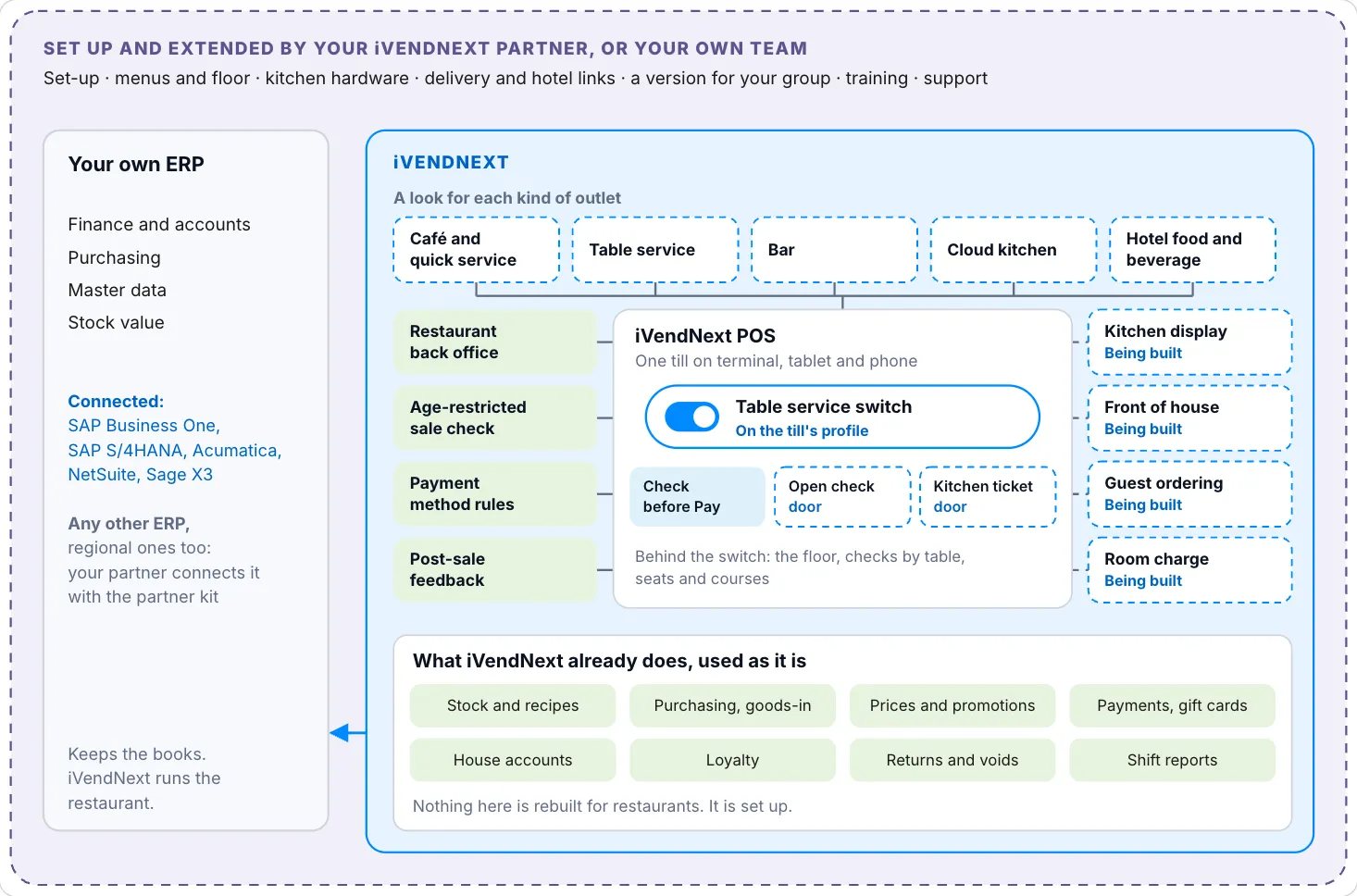
Hospitality on iVendNext is for a café, a coffee counter or a quick-service restaurant where the cashier takes the order and the payment at one counter. It runs on the iVendNext POS, the same till a shop uses. You add your dishes as items, your service charge as a charge, and your recipes and allergens through an app. This section shows how a counter like that runs today, what iVendNext offers a restaurant and how to choose your set-up.
What you can do today
| You want to | How |
|---|---|
| Sell dishes at a counter, with your own prices and tax | Add each dish as an item and give the store its own price list. See Adding your dishes. |
| Add a service charge | The charge comes with a dish by itself, or the cashier adds it to the sale. See Setting up the service charge. |
| Run a house account for a regular guest | Give the customer a credit limit, then take the sale on account. See Setting up a house account. |
| Keep selling when the connection drops | Turn on offline selling for the till. The cashier reviews and sends the sales when the connection returns. See Selling offline. |
| Know each dish's recipe, allergens and food cost | Use the Restaurant back office app. See its guide. |
| Take a dish's ingredients off stock | Issue them with a Stock Entry, or press Issue ingredients in the Restaurant back office app. See Taking ingredients off stock. |
Who does what
Someone who may create stores, items, prices and users sets everything up in Desk. A cashier or a manager sells on the till, at /pos, and counts the drawer at the end of the day. The till pages of the iVendNext POS describe the daily work in full: Starting your day, Ending your day and Working offline.
Where to start
Two pages help you decide. What iVendNext offers a restaurant lists each part with its limits and what is coming. Choosing your set-up shows which parts a café, a table-service restaurant, a bar, a cloud kitchen and a hotel's restaurant use.
Then open Setting up a café or quick-service counter. It follows the order a shop sets up in: the store, the dishes, the service charge, the till, the staff, the house account and offline selling.
From the first conversation to a live outlet
An iVendNext partner in your region usually runs these steps with you. A team with its own developers can run them itself.
- Check the fit. Put your own list of requirements beside What iVendNext offers a restaurant and Choosing your set-up. What the till and the apps meet unchanged is ready. The rest is set-up or an extension.
- Set up the outlets, tills and users, as for any retailer. Link your ERP if you have one. The SAP Business One and Acumatica connectors are listed in the App library.
- Build the menu. Follow Setting up a café or quick-service counter: each dish an item with its price and tax, the service charge, and the recipes and allergens.
- Plan the floor and the kitchen. Sections, tables and kitchen stations are coming. Until then a counter runs without them. See What is coming.
- Install the apps. Start with Restaurant back office. Add Age-restricted sale check where you sell alcohol or tobacco, and Payment method rules for house accounts.
- Set up payments: card readers, house accounts and gift cards. See Cash and card.
- Set up the hardware: receipt printers and cash drawers at the counter. The till runs in the browser on the tablets and phones you choose.
- Train each role and go live outlet by outlet: the counter, the servers, the kitchen and the managers.
- Run day to day. Your partner supports what it delivers, and iVendNext supports the product.
When your outlet works differently, a partner or your own developers can copy the free apps and change them. See How to customize.