
Optical on iVendNext
Optical · checked 2026-10-24
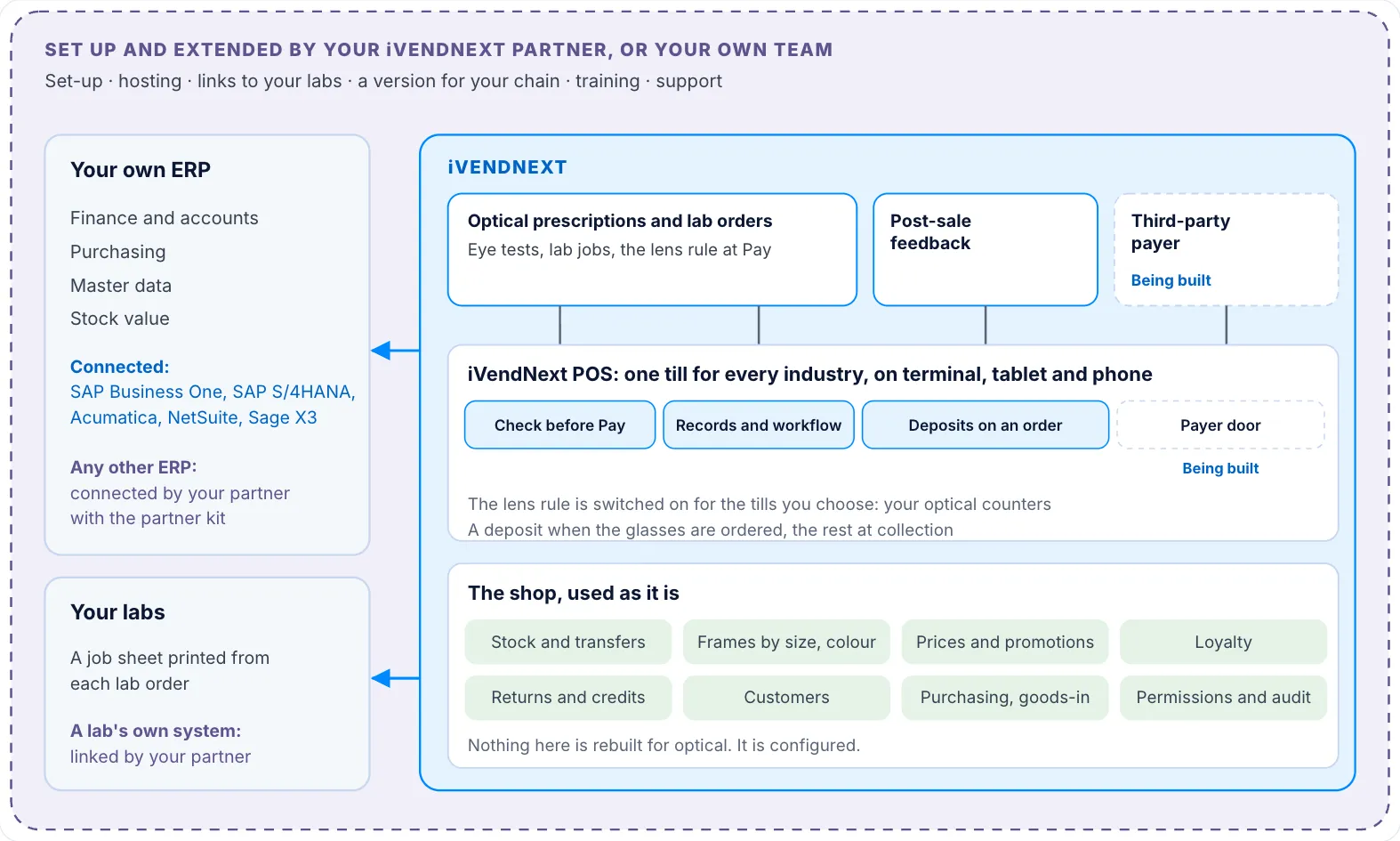
Optical on iVendNext is for an optical store: frames, spectacle lenses, contact lenses and solutions, with prescriptions and lab jobs. It runs on the iVendNext POS, the same till every store uses. A customer's prescription and the lab's job live in Desk, and a lens sells at the till only against a prescription in date. Your own ERP keeps the books beside iVendNext. This section lists the apps for the industry, links each app's guide, and shows how a store is set up.
Apps an optical store turns on
| App | What it does | Get it | Page |
|---|---|---|---|
| Optical prescriptions and lab orders | Keeps eye prescriptions and the lab's jobs in Desk, and sells lenses only against a prescription in date. | Free | Guide |
| Post-sale feedback | Asks each customer how their visit was and shows you the answers by store. | Free | Guide |
Library apps an optical store often adds
| App | What it does | Get it | Page |
|---|---|---|---|
| iVendNext Loyalty | Customers earn points on what they buy and spend them at the till, and the cashier sees each balance during the sale. | Needs a key | Guide |
| WhatsApp messages | Sends receipts, order confirmations and campaigns to your customers from your own WhatsApp Business account. | Needs a key | Guide |
| iVendNext Handheld | Stock work by barcode on a rugged handheld or a phone: receive goods, move stock between stores, count and look up items. | Needs a key | App library card |
Your ERP
| App | What it does | Get it | Page |
|---|---|---|---|
| SAP Business One | Keeps iVendNext and SAP Business One in step: master data comes across, and your stores' sales, returns and transfers post back. | Needs a key | App library card |
| Acumatica | Acumatica stays your system of record. Items, prices and customers come from it, and your stores' sales, returns and payments go back to it. | Needs a key | Guide |
Each app has its own card in the App library. Apps marked Free you install yourself. Apps marked Needs a key come with a key from iVendNext, which your partner adds. Apps marked Through your partner are installed and hosted for you by your partner. Your iVendNext partner can set up and host any of them and extend the free ones, or your own team can.
Being built
These parts are being built and have no guide yet: the payer at the tender and the third-party payer app.
Where to start
Open Setting up an optical store. It follows the order a store is set up in, from the first check of your needs to going live.