
Pharmacy on iVendNext
Pharmacy · checked 2026-10-24
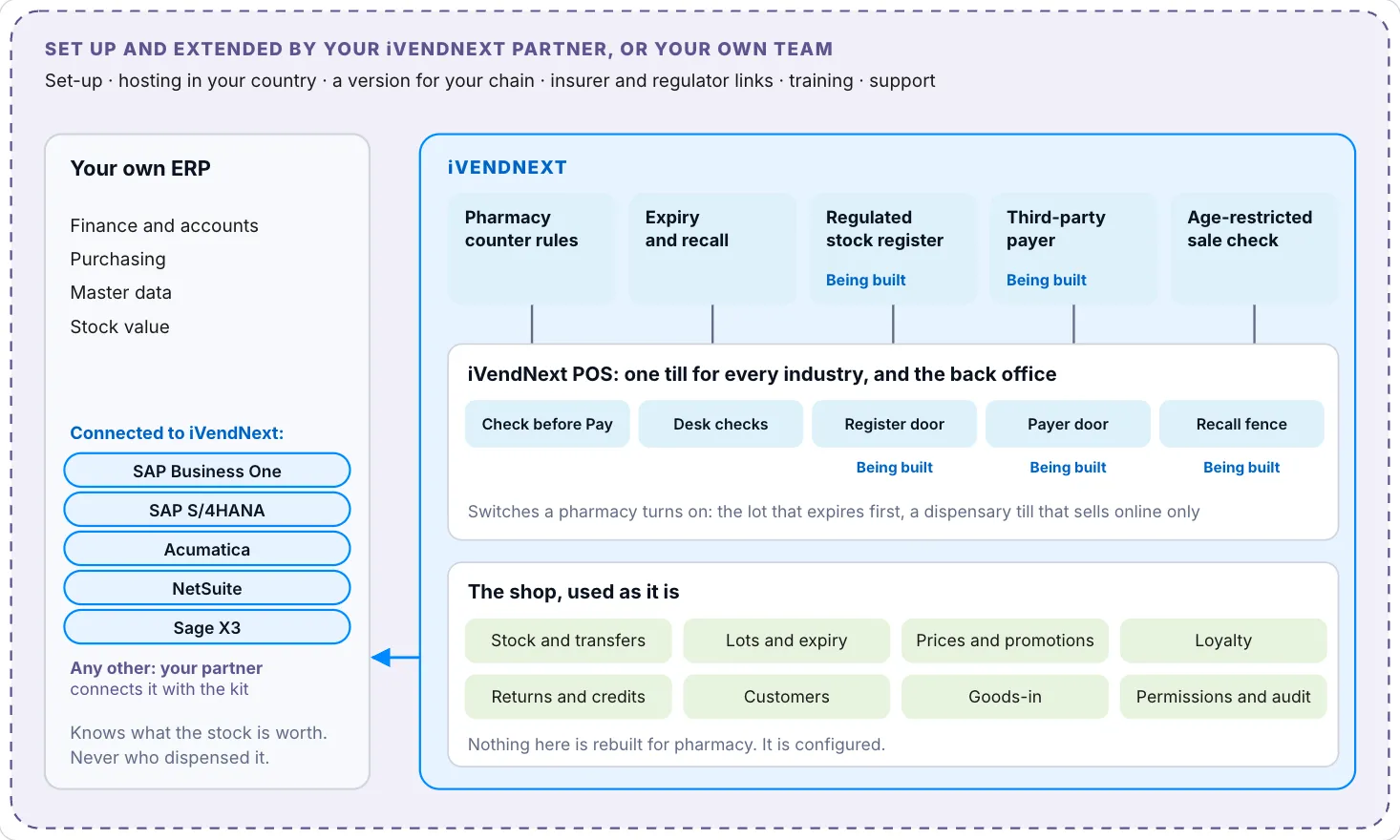
Pharmacy on iVendNext is for a shop that sells medicine under a license. It runs on the iVendNext POS, the same till a shop uses. Your stock, prices, loyalty and returns work as they do in any shop. You add what the license asks for: lots with expiry dates, a dispensary, prescription checks and recalls. This section shows which apps a pharmacy turns on, what each market asks, how a pharmacy is set up today and what is coming.
What you can do today
| You want to | How |
|---|---|
| Sell and track medicine by lot and expiry date | Give each medicine item lots and an expiry date. See Putting expiry dates on your medicine. |
| Sell the lot that expires first | Set the pick order. See Choosing the lot a sale gets. |
| Sell medicine from a dispensary with its own store and till | Make the store and a till profile for it. See Making the dispensary store and till. |
| Keep the regulator's price, with no discount from dispensary staff | Use a price list and a permission with every discount set to 0. See Prices and discounts. |
| Refuse a prescription sale with no valid prescription, or one from a pharmacist whose license has expired | Turn on Pharmacy counter rules. |
| Block a recalled lot at every online till, and record the regulator's visit at a disposal | Turn on Expiry and recall. |
| Know what your law asks of your shop for patient records | See Your duties under data-protection law. |
Apps a pharmacy turns on
A pharmacy takes only the apps its license and its market ask for. Each app that is listed has its own card in the App library, with its own consent. In Mexico, Nigeria and Ghana you install the two pharmacy apps yourself from the App library in Desk, with a key iVendNext issues for your site. Everywhere else your iVendNext partner installs them and hosts their services in your country. Each market's conditions for patient data leaving it, Mexico, Nigeria and Ghana included, are in Your duties under data-protection law.
| App | What it does in a pharmacy | Markets that ask for it | Page |
|---|---|---|---|
| Pharmacy counter rules | Checks a medicine sale at Pay and on Desk sales documents: a valid prescription with fills left, a pharmacist whose license is in date, the patient's ID for controlled medicine, quantity caps, and no return of dispensed medicine where its schedule refuses returns. It prints a daily prescriptions register. | All eight, with the rules set for each drug class | Guide |
| Expiry and recall | Blocks a recalled lot at every online till, finds each store's stock of it and the customers whose sales carried it, records the regulator's visit at a disposal, and refuses a short-dated delivery at goods-in. | All eight. Kenya, Nigeria, Ghana and Egypt set a time limit for each recall class. | Guide |
| Age-restricted sale check | Asks for ID at the scan of goods with an age limit, and refuses Pay without it. For medicine an age limit is your own policy. | Tobacco in Kenya, Nigeria, Ghana, Saudi Arabia, the UAE and Jordan. Alcohol in the UAE and Mexico. | Guide |
| Regulated stock register | Coming. Keeps each market's controlled-stock books as data, writes each line once, numbered and never edited, and prints it in a starting layout for your market's book, which your partner certifies. It is listed in Every app and rule as coming. | All eight. What the record may be, a book or software, differs by market. | Guide |
| Third-party payer | Coming. Keeps payers, plans and members, splits the sale between the patient and the insurer by your co-pay rules, and builds claims from booked sales. | Where patients are insured, mostly Kenya, Saudi Arabia, the UAE and Ghana | Guide |
What your market asks of a pharmacy shows each market's rules beside these apps.
Parts of iVendNext POS that pharmacy apps use
Some rules must apply on every path, or must book money or a legal line in the same save as the sale. An app cannot do that alone, so the POS app has general parts for them. Each one is off until you turn it on.
| Part | What it does | Used by |
|---|---|---|
| Check before Pay, and Desk document checks | An app's service answers before a sale is paid, at a return, and when a Desk document is submitted. | Pharmacy counter rules, Age-restricted sale check, Expiry and recall |
| Lot policy on the till profile | Coming. The till enforces the lot that expires first, with a manager's approval for another, and the fewest days left a sale may have. | Every pharmacy |
| Recall fence | Coming. A recalled lot is refused on every stock document that sends stock out, imports and the API included. | Expiry and recall |
| Register door | Coming. Writes the legal line in the same save as the sale or receipt, from the till, Desk, goods-in from your ERP or Handheld. | Regulated stock register |
| Payer at the till | Coming. Splits the sale at the tender and books the insurer's share as an amount the insurer owes. | Third-party payer |
Library apps a pharmacy often adds
These are general apps from the App library. A pharmacy uses them as any shop does.
| App | What it does in a pharmacy | Page |
|---|---|---|
| Expiry markdown | Marks down lots near their expiry date. Give it only the item groups your market lets you sell below the listed price. | Guide |
| Coupon rules | Limits a coupon to a customer's first purchase or to one customer group. | Guide |
| Gift card on spend | Gives a customer your own gift card when a sale reaches your threshold. | Guide |
| Lucky draw | Runs a shop-and-win campaign over your sales. | Guide |
| Call-centre orders by district | Sends each phone order to the store that serves the customer's district. | Guide |
| iVendNext Handheld | Receives goods and counts stock by barcode scan. | App library card |
Before you turn an app on, read two things.
- A till profile answers at most three checks, and they share 10 seconds. Pharmacy counter rules takes 5 of them on every profile it answers, and Age-restricted sale check takes 4. A profile with both has no room for Coupon rules, and iVendNext refuses to switch on a check that goes past 10 seconds.
- The two pharmacy apps run on CitiXsys hosting, in the United States, when you install them from the App library in Mexico, Nigeria or Ghana, or with your partner in your country. Age-restricted sale check and the five general apps from Expiry markdown to Call-centre orders by district run on CitiXsys hosting too. Each page lists what it is sent under What leaves your shop. Read Your duties under data-protection law before you turn one on in a country that keeps patient data at home.
What is coming
These are not available yet, so this section has no steps for them. They are listed in the order they are planned to be finished.
- The lot policy on the till profile, patient fields that only pharmacists see at the till, and a pharmacy filter in the App library.
- The recall fence: a recalled lot refused on every stock document that sends stock out, imports and the API included.
- The payer at the till: the insurer's share at the tender, owed by the insurer, with claims and remittances in the Third-party payer app.
- The regulated stock register: each market's books, written in the same save as the sale or receipt and printed in a starting layout for the regulator's book, which your partner certifies.
- More at the till: the lot chosen offline, items sold online only, and a dispensing label with dose and strength.
- The pharmacy apps in Arabic and Mexican Spanish.
- Installing the pharmacy apps yourself from Desk in Dubai, once their host runs there. Until then, your partner installs them.
- Track and trace in the UAE, Saudi Arabia and Egypt, built with the first pharmacy that needs it.
Who does what
Someone who may create items, stores, prices and users sets the pharmacy up in Desk. The pharmacist in charge keeps the pharmacists, the premises license and the drug schedules. A pharmacist and a cashier sell on the till, at /pos. The till pages describe the daily work in full: Starting your day, Ending your day and Working offline.
From the first conversation to a live dispensary
An iVendNext partner in your region usually runs these steps with you. A team with its own developers can run them itself.
- Check the fit. Put your own list of requirements beside Apps a pharmacy turns on and What your market asks of a pharmacy. What the apps meet unchanged is ready. The rest is setup or an extension that your partner builds.
- Choose where it runs. Patient data stays in the country in Saudi Arabia and the UAE, and leaves Egypt only under a license. It leaves Kenya only with consent and safeguards, and a copy may have to stay there. It leaves Jordan only for the patient's treatment or with their consent. Host your site and the pharmacy apps' services to match. See Where patient data may be kept.
- Set up the shop: stores, tills, prices and users, as for any retailer. Link your ERP if you have one. The SAP Business One connector is in production, and an Acumatica connector is listed. Goods-in can stay in your ERP.
- Make it a pharmacy. Follow Setting up a pharmacy, from the medicine groups to the default company. A setup script that applies the same settings in one run is available on request.
- Turn on the apps, from the App library or through your partner as Apps a pharmacy turns on says: Pharmacy counter rules and Expiry and recall first. Add Age-restricted sale check where you sell tobacco or alcohol. The register and the payer app follow as they arrive.
- Load the data: the drug schedules as your market's classes, each item's schedule, the pharmacists and their licenses, and the premises license. For insured sales, when the payer app arrives: payers, plans, formularies and members.
- Choose the language. Desk already runs right to left. The pharmacy apps in Arabic and Mexican Spanish are coming.
- Train each role and go live store by store: the pharmacist in charge, the pharmacists, the counter staff, the recall officer and, with the payer app, the claims clerk.
- Run day to day. Your partner supports what it delivers, and iVendNext supports the product.
Before you turn an app on, read Your duties under data-protection law.