
Grocery on iVendNext
Grocery · checked 2026-10-24
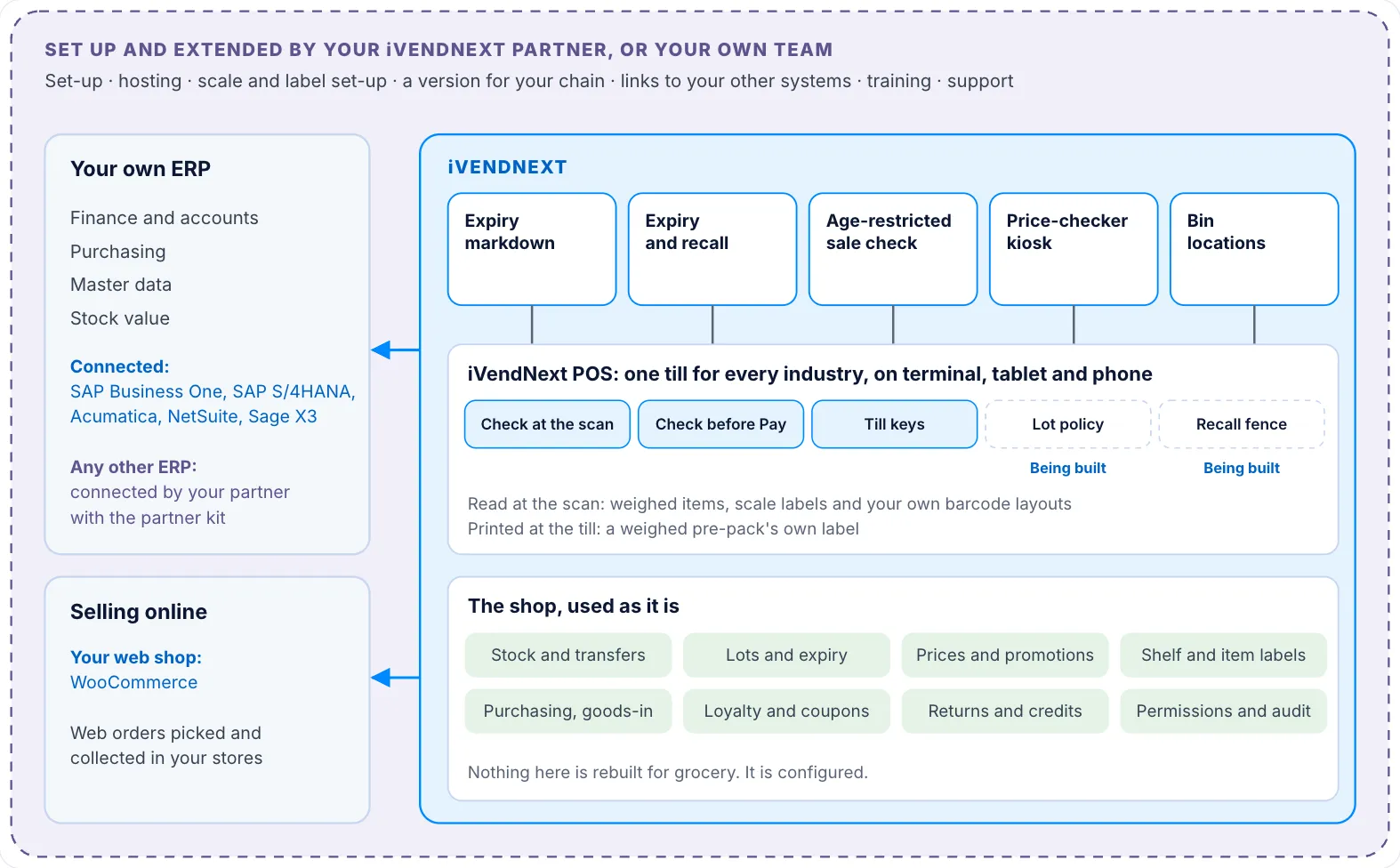
Grocery on iVendNext is for a supermarket or grocery store: a corner or convenience store, a supermarket or hypermarket chain, a discount or wholesale store, or an express store. It runs on the iVendNext POS, the same till every store uses. Fresh food adds a date and a weight to every pack. The till reads both from the barcode, and small apps from the App library mark down lots near their date and pull a recalled lot from every online till at once. Your own ERP keeps the books beside iVendNext. This section lists the apps for the industry, links each app's guide, and shows how a store is set up.
Apps a supermarket turns on
| App | What it does | Get it | Page |
|---|---|---|---|
| Expiry markdown | Marks down lots near their expiry date by steps you set. One press a day gives each lot its own lower price, and the till rings it. | Free | Guide |
| Expiry and recall | Blocks a recalled lot at every online till, finds each store's stock of it and the customers who bought it, and refuses a short-dated delivery at goods-in. | Through your partner | Guide |
| Age-restricted sale check | Shows the date of birth to check when the cashier scans a restricted item, records the ID check on the sale, and refuses Pay without it. | Free | Guide |
| Price-checker kiosk | A tablet on the shop floor where a customer scans an item and sees its name, picture and price. | Free | Guide |
| Bin locations | Keeps locations, aisles and bins inside a store, and shows the cashier or the floor staff which bin an item is in. | Free | Guide |
| Click and collect | Lists the web orders a store must pick, and records who collected each one. | Free | Guide |
Library apps a supermarket often adds
| App | What it does | Get it | Page |
|---|---|---|---|
| Till guard rules | Checks at the till: no line at a placeholder price, a most per line, a manager for a large sale, and a question when a flagged item is scanned. | Free | Guide |
| Coupon rules | Rules for your own coupons, such as a first purchase only or one customer group only, checked when the cashier presses Pay. | Free | Guide |
| Gift card on spend | Gives a customer your own gift card when a sale reaches your threshold. | Free | Guide |
| Payment method rules | Sets which payment methods each customer group may use at the till. | Free | Guide |
| Customers by store | Sets at which stores each customer group may buy, such as trade customers at the trade counter only. | Free | Guide |
| iVendNext Loyalty | Customers earn points on what they buy and spend them at the till, and the cashier sees each balance during the sale. | Needs a key | Guide |
Hardware and handheld
| App | What it does | Get it | Page |
|---|---|---|---|
| Counter hardware | Connects the counter's cash drawer, receipt printer and customer display to the till. | Needs a key | Guide |
| iVendNext Handheld | Stock work by barcode on a rugged handheld or a phone: receive goods, move stock between stores, count and look up items. | Needs a key | App library card |
Your ERP and your web shop
| App | What it does | Get it | Page |
|---|---|---|---|
| SAP Business One | Keeps iVendNext and SAP Business One in step: master data comes across, and your stores' sales, returns and transfers post back. | Needs a key | App library card |
| Acumatica | Acumatica stays your system of record. Items, prices and customers come from it, and your stores' sales, returns and payments go back to it. | Needs a key | Guide |
| WooCommerce | Links your web shop: products, prices and stock go to the shop, and paid web orders, payments and refunds come back. | Needs a key | Guide |
Each app has its own card in the App library. Apps marked Free you install yourself. Apps marked Needs a key come with a key from iVendNext, which your partner adds. Apps marked Through your partner are installed and hosted for you by your partner. Your iVendNext partner can set up and host any of them and extend the free ones, or your own team can.
Being built
These parts are being built and have no guide yet: a lot policy at the till and a recalled lot named at the scan; a recall fence on every stock document; the lot chosen while the till is offline; and orders from delivery marketplaces.
Where to start
Open Setting up a supermarket. It follows the order a store is set up in, from the first check of your needs to going live.