
Use the Docs and Me tabs to find your work, recover it when the connection drops, correct what you posted, and change your settings.
The Docs tab
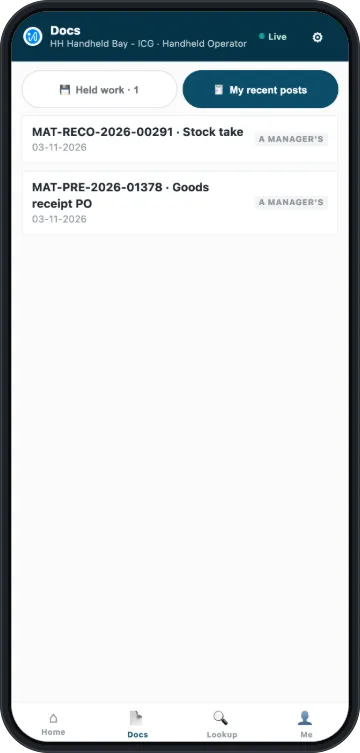
Docs has two lists.
Held work is work you started and have not posted. It stays on this device until you post it or discard it. Tap Open to carry on with one.
My recent posts lists your own posts from the last 7 days, up to 40 documents, from any device. It shows nobody else's work, and nothing older. If you have the right to correct documents, a row shows ↩ Correct. Otherwise it shows a manager's.
Nothing in Held work posts by itself. You open it, the app checks it against what the back office has now, and you post it.
When the connection drops
The app needs a connection to post. If the connection drops while you work, the dot at the top changes to Offline. The lines you have already scanned stay on the device, even if you close the app or the battery dies. The review screen says so: "⚠ Offline. Your work is kept on this gun."
A new scan usually needs the connection too, so the app refuses it until the connection returns. On an open document, a plain barcode for one of its lines can still go in.
The app does not send your work by itself when the connection comes back. You review it first:
- Open Docs, and tap Open on the work.
- The app checks each line against what the back office has now.
- Post it, or fix what the screen names.
A screen that has to read from the back office cannot open without a connection. It says Couldn't load this screen and offers Retry.
| The review says | What it means | What to do |
|---|---|---|
| Nothing moved since you captured it | Every line still stands | Tap Post it |
| "Things moved since you captured this" | Some lines changed, and the table names them | Fix those lines, or post the ones that are fine. The rest stay in Held work |
| ⏸ This cannot be posted. | The back office has closed that date | Ask the back office to open the date or post it. For a count, count again at today's date |
| "This held count has run out of road" | The count is too old to post | Count it again |
To remove saved work, tap Discard this…, then tap again. The app asks twice because the work cannot come back.
Correcting a posted document
You need May Correct a Posted Document on your record, and the role for that document. Otherwise, ask a manager or the back office.
- Right after you post, tap ↩ Correct on the posted screen. Later, open Docs, then My recent posts, and tap ↩ Correct on the row.
- Read what the screen offers for this kind of document.
- Tap Confirm, or the action that the screen names.
Each correction is a new, recorded action. The first document stays in the record.
| You posted | What you can do |
|---|---|
| A goods receipt | Send it back to the vendor, which opens a return with your lines. You can also Cancel it if nothing else depends on it |
| A vendor return | Cancel the vendor return |
| A count | Count it again. The newer count replaces the old one |
| A goods issue | Receive it in again, as a new receipt at a value you type |
| A receipt from Stock management | Issue it out again |
| A move | Move it back |
| A transfer shipment or a transfer receipt | Cancel it. It reverses at the values it was booked at |
| A purchase order | Put it on hold or Close it. An order has moved no stock, so there is nothing to reverse |
| A transfer request | Stop it |
| A delivery | Cancel it. See below |
| A pick | Nothing here. To undo a pick, cancel the delivery it was picked for |
Canceling a delivery
A cancel on a delivery shows four points. Read them before you confirm.
- The stock comes back, at the values it left at.
- The pick reopens, so you can pack and deliver it again.
- Some reservations do not come back. Stock set aside for this order stays set aside. If the order is being abandoned, tell the back office.
- Commission is recalculated. Any commission this delivery booked is worked out again, and its packing paperwork is canceled with it.
If an invoice bills the delivery, Cancel the delivery stays off and says "An invoice bills this. The back office cancels it first." Once the back office cancels the invoice, you can cancel the delivery.
When a cancel is refused
| The screen says | What it means | What to do |
|---|---|---|
| Not yours to cancel. | It moves stock in a store you are not set up for | Ask the back office, or someone at that store |
| "Something else points at it" | Another document has to be canceled first | Ask the back office |
| ⏳ Not yet. Try again in a moment. | The system is still working out item costs. It clears by itself, usually within the hour | Try again later. There is nobody to ask |
The Me tab
The Me tab shows who is signed in, since when, and on which device.
- Store: tap Switch to change store. It changes everything you do next.
- My activity today: how many documents you posted today, and only yours.
- Device log: a list of recent events on this device for support. It keeps no passwords or other secrets.
- Trusted devices: shown if you have May Retire a Handheld. See Removing a device.
- Sign out: the button says how much saved work stays on this device. It stays there for review after you sign in again.
Preferences
Tap the gear at the top of any screen.
| Setting | What it does | Where it applies |
|---|---|---|
| Language | The language of the screens | Follows you to every device |
| Text size | S, M, L or XL | Follows you to every device |
| Print labels after receiving | Adds shelf labels to the print list when a receipt posts. On by default | Follows you to every device |
| Vibrate on a rejected scan | Phones only. Off by default | Follows you to every device |
| Coaching notes | Extra notes on each screen that explain the rules. Off by default. Refusals and warnings show either way | Follows you to every device |
| Theme | Auto, Light or Dark | This device only |
| Scan input | Camera or Gun. Shows only where the camera can be used | This device only |
On the sign-in screen, the gear shows only the settings that stay on the device.