
iVendNext Handheld · checked 2026-11-03
Watch the film: iVendNext in 90 seconds: the open retail platform
Watch the film: iVendNext Handheld: the stock jobs in the store's hand
iVendNext Handheld is the app your store team uses for stock work. It runs in the browser on a rugged handheld device, a phone or a tablet. You receive goods, move stock, count it, pick, pack and deliver orders, and look items up. Everything you post goes to the same stock records the rest of iVendNext uses.
It is not a till. To sell to a customer, use the iVendNext POS. The Handheld takes no payment, and the device prints nothing.
What you can do
| You want to | Open | See |
|---|---|---|
| Receive goods against a purchase order | Goods Receipt PO | Receive stock |
| Raise a purchase order | Purchase Order | Receive stock |
| Send goods back to a vendor | Goods Return to Vendor | Receive stock |
| Ask another store for stock, send it and receive it | Stock Transfer | Move stock |
| Take stock out, bring stock in, or move it straight to another store | Stock management | Move stock |
| Count a shelf or a store | Stock Take | Count stock |
| Pick an order, pack it into cartons and deliver it | Pick · Pack · Deliver | Pick, pack and deliver |
| Find an item's price and stock | Item Lookup | Look things up |
| See where an item is and how it moved | Stock Inquiry | Look things up |
| Add shelf labels to the print list | Item Lookup | Look things up |
| See your saved work and your recent posts | the Docs tab | Your documents |
Who does what
A store colleague does the daily stock work on the device. Everybody sees all nine tiles on the home menu. A tile you cannot use is gray and says why.
A manager can also revoke a device and correct a posted document. A manager sees who has which pick in Handheld Operations, in iVendNext Desk.
An administrator sets people and stores up in iVendNext Desk. The screens of the app call Desk and the people who work in it the back office, and this help does the same.
Words the screens use
On a phone-sized screen, the app calls your device a gun. On a screen 900 pixels wide or more, it calls it a desk. This help says device, and you will only meet the other two words where we quote a screen.
To post means to send your work to the back office, so that it becomes a stock record.
A tracked item is an item you track by serial number or by batch.
On a tablet
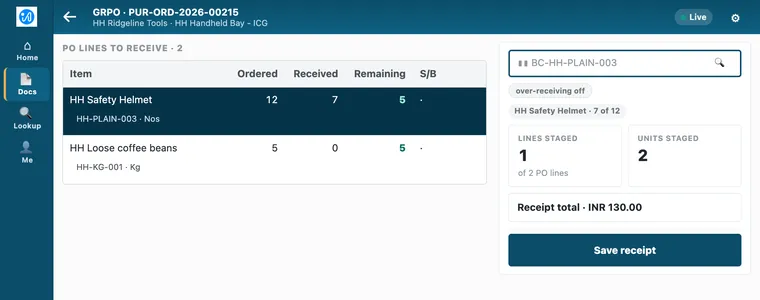
On a screen 900 pixels wide or more, the app lays itself out for a tablet. Ordered, received and remaining quantities sit side by side, and the tabs move to the left. The steps are the same.
Where to start
If nobody has used the app at your store yet, your administrator starts with Set up the Handheld. If you have been set up, go to Sign in and scan. When a screen stops you, When something goes wrong lists what each message means.